

How to Check the Number of SIMs
phones have become an essential part of life in Pakistan. Almost every person now uses one or more SIM cards for communication, banking apps, internet services, and social media. With the rapid growth of mobile users, the misuse of unregistered SIM cards also increased over the years.
NADRA Launches New Website with Maps, Online Verification for CNICs
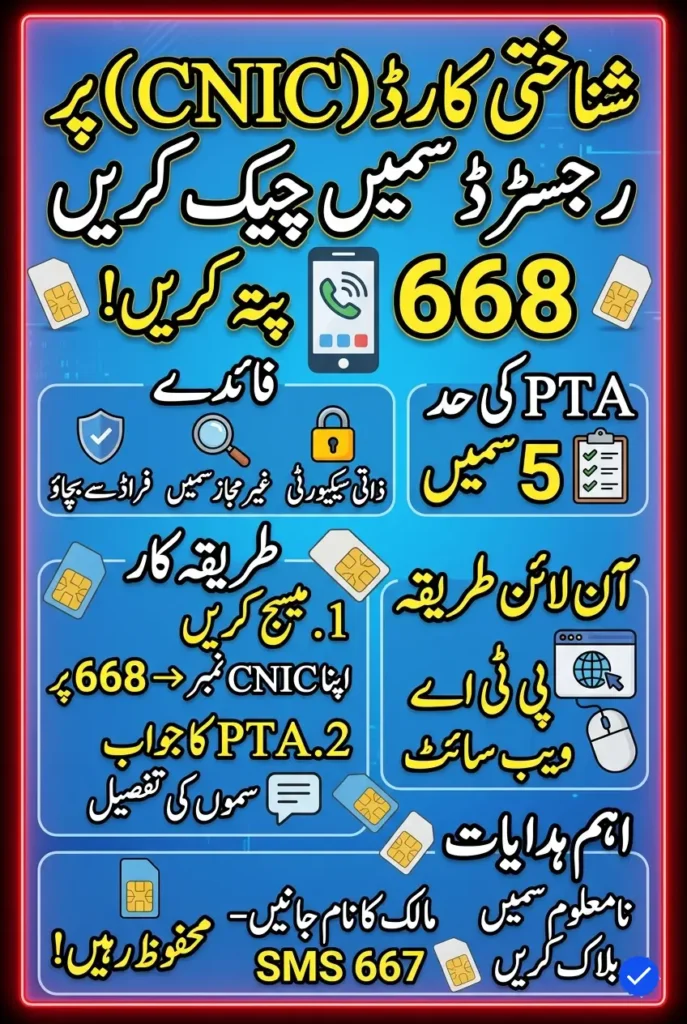
To improve security and reduce illegal activities, the Pakistan Telecommunication Authority (PTA) introduced the SIM Information System. This system allows users to check how many SIM cards are registered against their CNIC and helps people identify unauthorized numbers linked to their identity.
Why Checking Registered SIMs Is Important
Many people do not know the exact number of SIM cards issued on their CNIC. Sometimes old SIMs remain active for years, while in other cases unauthorized SIMs may be registered without the owner’s knowledge.
Checking your registered SIMs regularly can help protect your identity and prevent misuse. If a SIM registered in your name is used in illegal activity, it can create serious legal problems for you.
PTA SIM Limit on One CNIC
PTA allows a maximum of five SIM cards on one CNIC. These SIMs can belong to different mobile operators such as Jazz, Zong, Ufone, or Telenor.
If you already have five active SIMs and want a new connection, you must first block or close an unused SIM before purchasing another one.
How to Get NADRA Tracking and Verification Service Online
Benefits of SIM Verification
There are several benefits of checking SIMs registered against your CNIC:
- Protects against fraud
- Helps identify unauthorized SIMs
- Improves personal security
- Prevents illegal use of your identity
- Keeps your mobile record updated
Regular verification is especially important for people who frequently change mobile numbers.
How to Check SIMs Through PTA Website
PTA offers an online SIM Information System that allows users to check SIM details within seconds. This method is free and can be accessed from mobile phones or computers.
Follow these simple steps:
- Visit the official PTA SIM Information website.
- Enter your CNIC number without dashes.
- Complete the captcha verification.
- Click the submit button.
- The website will show all active SIMs registered against your CNIC.
The system displays operator-wise details so users can easily identify the number of SIMs on each network.
How to Check SIMs Through SMS
Users can also check their registered SIMs through SMS if they do not have internet access.
Here’s the process:
- Open the messaging app on your phone.
- Type your CNIC number without hyphens.
- Send the message to 668.
- Wait for the reply message from PTA.
You will receive details about the number of SIMs registered against each mobile operator.
PTA charges Rs. 2 plus tax for every SMS sent to 668.
Govt May Allow Market-Based Sugar and Wheat Prices What It Means
What to Do If Unknown SIMs Are Found
If you notice SIM cards that you do not recognize, you should immediately contact the relevant mobile company.
Visit the nearest franchise or customer service center and request them to:
- Verify SIM ownership
- Block unauthorized numbers
- Update your mobile record
Taking quick action can protect you from fraud or criminal misuse.
Understanding SIM Cloning
SIM cloning is an illegal process in which criminals copy the data of one SIM card onto another SIM. This allows another person to use the same mobile number on a different device.
SIM cloning is dangerous because criminals may use cloned SIMs for illegal calls, scams, or criminal activities while the original owner becomes responsible.
Signs of SIM Cloning
Some common signs of SIM cloning include:
- Calls or messages you never made
- Sudden network issues
- Unusual balance deductions
- Receiving OTPs without requesting them
If you suspect SIM cloning, contact your mobile operator immediately and block the SIM.
PTA Biometric Verification System
PTA introduced the Biometric Verification System (BVS) to improve mobile security in Pakistan. Under this system, every SIM card must be verified through fingerprints before activation.
The biometric system helps users:
- Buy new SIM cards
- Obtain duplicate SIMs
- Transfer SIM ownership
- Re-verify existing SIMs
- Solve portability issues
This system has greatly reduced the number of illegal SIM registrations across the country.
Pakistan Fuel Price Update Petrol and Diesel Rates Slightly Reduced
How to Check SIM Owner Name
Users can also verify the owner name of a SIM card through a simple SMS service.
Follow these steps:
- Open your messaging application.
- Send a blank message to 667.
- Wait for the response message.
You will receive the registered owner’s name of the SIM card currently being used in your phone.
How to Block an Unused SIM
If you are no longer using a SIM card, it is better to block it to avoid misuse.
To block a SIM:
- Visit the nearest franchise of your mobile operator.
- Carry your original CNIC.
- Request SIM cancellation or blocking.
- Complete biometric verification if required.
The company will deactivate the SIM immediately.
Safety Tips for Mobile Users
To keep your SIM secure, users should follow some important safety measures:
- Never share CNIC copies unnecessarily
- Avoid buying unregistered SIMs
- Verify SIM ownership regularly
- Block unused SIM cards
- Report suspicious activity immediately
These steps can help protect your identity and personal data.
FAQs
1. How many SIMs can be registered on one CNIC?
PTA allows a maximum of five SIM cards on one CNIC.
2. How can I check SIMs registered against my CNIC through SMS?
Send your CNIC number without dashes to 668.
3. Is there any fee for checking SIM details?
Yes, PTA charges Rs. 2 plus tax for SMS verification.
4. How can I check the owner name of a SIM?
Send a blank SMS to 667 to receive the SIM owner’s name.
5. What should I do if I find an unknown SIM on my CNIC?
Immediately contact the relevant mobile operator and request the SIM to be blocked.
Banks Get Special Power to Publicly Shame and Seize Property of Loan
Final Words
Checking the number of SIMs registered against your CNIC is extremely important for your security and privacy. PTA’s SIM Information System has made it easy for users to monitor and manage their mobile connections through both online and SMS services.
People should regularly verify their SIM details and immediately report unauthorized numbers to the relevant mobile operator. Keeping your SIM record updated can help prevent fraud, identity theft, and legal complications in the future.